An AI assistant that knows the record
Ask about the patient you have open and get answers with the sources visible. Get the consultation written up as a note, and referrals and summaries from what is already there — all inside the record system you already use.

 Add background


Ask the record
No more searching through note after note. Ask the question you would ask a colleague, and the assistant finds its way through the record and summarises it for you — with the sources visible.
- "What has happened since last time?" — an answer without opening a single note
- Taking over a patient? Get the pathway summarised
- Every answer shows which notes it is based on
- All in the same window you write in

The consultation becomes a record note
Start the recording when the patient comes in. Vidd follows the conversation and writes the note in your own template while you talk.
- A structured note in the templates the practice uses
- Your own trigger words and phrases
- You read it through and sign before anything is saved


The paperwork is filled in from the record
Choose the document and the template, and Vidd brings up what belongs there — history, findings, test results and what has been tried before. You get a draft to go through, not a blank form.
- Sick notes, NAV statements, referrals and certificates
- Every sentence points to the note it is based on
- A library of templates, or the practice's own
The forms that take the longest
Most of what a GP has to fill in is already in the record — spread over years and many notes. Vidd brings up what belongs there and fills in the draft. You check and sign.
Medical statement to NAV
Work assessment allowance and disability benefit require a description of function over time. Vidd gathers the pathway, the treatments tried and what they achieved.
Sick note and extension
Diagnosis, function and the plan ahead are taken from the notes, so an extension does not start from scratch every time.
Referral to a specialist
History, findings, test results, medication list and earlier treatment are put together into one draft.
Application for individual reimbursement
The Helfo application requires documentation of what has been tried and why it did not work. It is in the record — Vidd finds it.
Certificates and health declarations
Driving licence, insurance and other certificates are filled in from what is already recorded, with the source visible.
Care allowance and benefits
Statements on care needs, basic benefit and attendance benefit build on long pathways. Vidd summarises them for you.
Everything WebMed KI can do
One solution inside the record system: an assistant that knows the patient, notes that write themselves from the consultation, and summaries from what is already in the record.
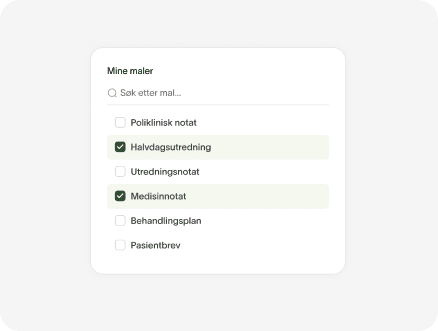
Choose note templates
Choose which templates to create in the consultation. You can create several notes at once.
Trigger phrase or word
Phrase
Create your own words and phrases
Define your own trigger phrases and how they should be written in the note.
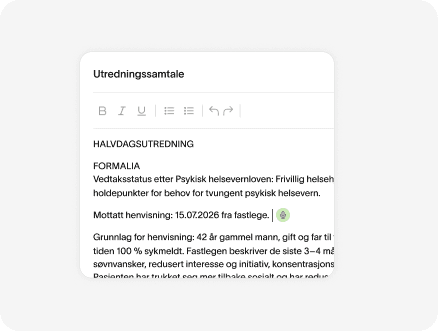
Edit the note
When the draft is ready you can edit it with text, transcription and the built-in chat.
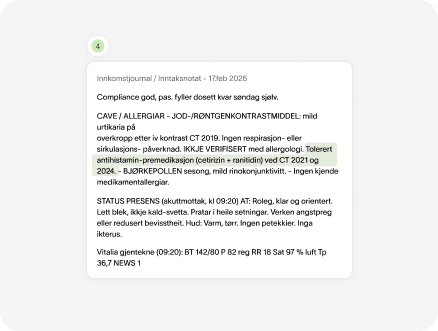
See the sources
See which note in the record each sentence is based on, directly in the draft.
Psychiatry standard
Standard template for psychiatric consultations. About what this template is used for
5 sections
Internal medicine standard
Standard template for internal medicine consultations. About what this template is used for
5 sections
Templates for every specialty
Use the library's templates, or set up your own for what the practice writes most often.

Publishing to WebMed
Publish to WebMed
The note goes where it should once you have signed. No copying text between windows.
Patient data stays in Norway
The note is stored in WebMed. Speech recognition and language models run on dedicated hardware in Norway, without external AI or cloud services.
Norwegian infrastructure
Speech recognition and language models run on dedicated hardware in Norway. No part of the processing goes to external AI or cloud services.
The audio is deleted
The recording is deleted when the note is published in WebMed. It is never used to train models.
Built for Norwegian requirements
Vidd is CE marked as a medical device and developed in line with the Norm, the Patient Records Act and the Health Personnel Act.
Questions we get from GP practices
No. You carry on in WebMed. Vidd sits on top, and the note ends up where it always does.
You are. Vidd produces a draft that the treating doctor reads through and signs. The tool does not provide clinical decision support.
No. The recording is deleted when the note is published. What remains is the note in the record, not the conversation.
Experience says the opposite. When you do not have to write while you listen, you look at the patient instead of the screen. The patient is told that the tool is being used.
Setup is done against your existing WebMed installation. We train the people who will use it, and you can start with one doctor.
Want to try WebMed KI?
We set it up against your own WebMed, with the templates you use today, so you can test it in practice.